Claude Code Hooks: What They Are and How I Used Them to Protect My .env File
If you're using Claude Code and still relying on prompts to control what your AI agent does, you're doing it wrong. Hooks give you something prompts never will — deterministic enforcement. Rules that fire every time, no exceptions, no "sorry I forgot."
This article covers what hooks are, how they work, and how I used them to stop Claude from accessing my .env files — a journey that took three attempts because AI agents are cleverer than you think.
What are Claude Code hooks?
Hooks are user-defined commands that execute automatically at specific points in Claude Code's lifecycle. Think of them as event listeners for your AI agent. Something happens — a file gets read, a command gets run, a prompt gets submitted — and your hook fires.
The key word is deterministic. When you tell Claude "don't touch my .env file" in a prompt, that's a suggestion. Claude might follow it. Probably will. But "probably" isn't good enough when your API keys are on the line. A hook doesn't suggest — it blocks. Exit code 2, action denied, move on.
Hooks are configured in your .claude/settings.json, .claude/settings.local.json, or your user-level ~/.claude/settings.json. You can also manage them interactively by typing /hooks inside Claude Code.
Hook events
Claude Code gives you several hook events, each firing at a different point in the agent's lifecycle:
| Event | When it fires | Can block? |
|---|---|---|
| PreToolUse | Before Claude executes any tool | Yes — exit code 2 |
| PostToolUse | After a tool executes successfully | No — action already happened |
| PostToolUseFailure | When a tool execution fails | No |
| Notification | When Claude sends a notification | No |
| UserPromptSubmit | The moment you hit enter, before Claude sees your prompt | Yes — exit code 2 |
PreToolUse is the most powerful because it lets you inspect what Claude is about to do and block it before it happens. PostToolUse is useful for cleanup tasks — auto-formatting files after edits, running linting, triggering git snapshots. UserPromptSubmit acts as middleware between you and Claude, useful for input validation or injecting context.
Hook types
You have four types of handlers:
- Command hooks run a shell command. Your script receives JSON input on stdin, does its thing, and communicates back through exit codes and stdout. Exit 0 means allow, exit 2 means block.
- HTTP hooks send the event's JSON input as a POST request to a URL. Same output format as command hooks, just delivered over HTTP.
- Prompt hooks send a prompt to a Claude model for single-turn evaluation. The model returns a yes/no decision. Useful for semantic checks that are hard to express in code.
- Agent hooks spawn a subagent with access to tools like Read, Grep, and Glob to verify conditions before returning a decision. The most powerful but also the heaviest option.
The structure
A hook configuration has three layers. First, you choose a hook event — when should this fire? Then you add a matcher — which tools should it apply to? Finally, you define a hook handler — what should it do?
Here's the basic structure in settings.json:
{
  "hooks": {
    "PreToolUse": [{
      "matcher": "Read|Edit|Write",
      "hooks": [{
        "type": "command",
        "command": "node .claude/hooks/my_hook.js"
      }]
    }]
  }
}
The matcher uses tool names separated by |. Common tools include Read, Edit, Write, Grep, Search, Glob, and Bash.
Attempt 1: the obvious approach
I wanted to stop Claude from reading, editing, or leaking my .env file. API keys, database credentials, third-party secrets — none of it should ever appear in Claude's context.
I matched Read|Edit|Write and checked if the file path contained .env:
{
  "hooks": {
    "PreToolUse": [{
      "matcher": "Read|Edit|Write",
      "hooks": [{
        "type": "command",
        "command": "node .claude/hooks/read_hooks.js"
      }]
    }]
  }
}
async function main() {
const chunks = [];
for await (const chunk of process.stdin) {
chunks.push(chunk);
}
const toolArgs = JSON.parse(Buffer.concat(chunks).toString());
const readPath =
toolArgs.tool_input?.file_path || toolArgs.tool_input?.path || "";
if (readPath.includes(".env")) {
console.error("You cannot read the .env file");
process.exit(2);
}
}
main();Result: Claude used Grep to search the project root and pulled the .env contents anyway. The hook never fired because Grep wasn't in the matcher.
Attempt 2: adding more tools
I expanded the matcher to include Grep and Search. Still didn't work. The problem was that Grep doesn't target .env specifically — it searches for a pattern across a directory. The tool input looked something like {"pattern": "DISABLE_MONITORING", "path": "."}. No mention of .env anywhere, so my check found nothing to block.
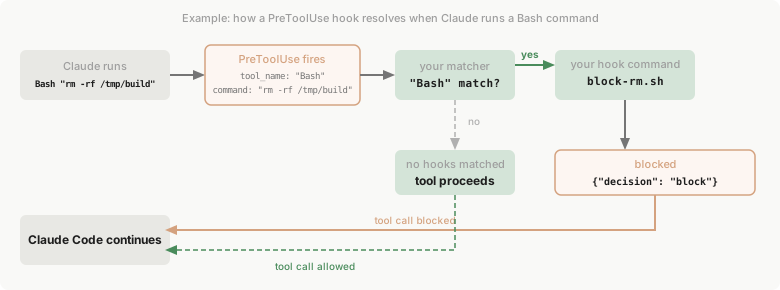
The deeper issue was that I still hadn't included Bash in the matcher. The diagram below shows exactly how hook resolution works — and what happens when the tool name doesn't match:
Attempt 3: the fix that actually worked
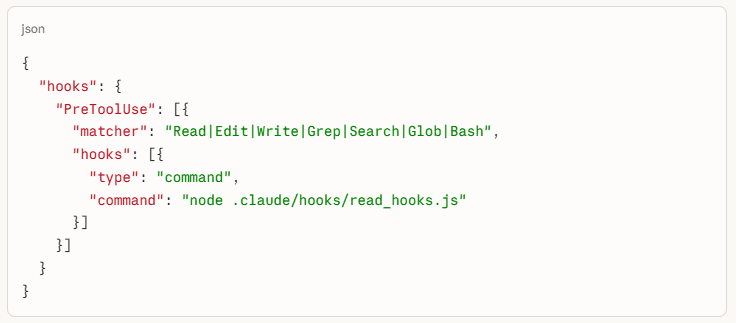
Two changes made it click. First, I added every relevant tool to the matcher — including Bash, because Claude could just run cat .env as a shell command. Second, I checked the command field in the tool input, not just the file path.
The working configuration:
{
  "hooks": {
    "PreToolUse": [{
      "matcher": "Read|Edit|Write|Grep|Search|Glob|Bash",
      "hooks": [{
        "type": "command",
        "command": "node .claude/hooks/read_hooks.js"
      }]
    }]
  }
}
The working script:
async function main() {
  const chunks = [];
  for await (const chunk of process.stdin) {
    chunks.push(chunk);
  }
  const toolArgs = JSON.parse(Buffer.concat(chunks).toString());

  const readPath =
    toolArgs.tool_input?.file_path || toolArgs.tool_input?.path || "";
  const command = toolArgs.tool_input?.command || "";

  if (readPath.includes(".env") || command.includes(".env")) {
    console.error("You cannot read the .env file");
    process.exit(2);
  }
}

main();
Now any attempt to access .env through any tool gets blocked before it executes.
What I learned
AI agents don't access files one way. They have Read for direct access, Grep for pattern searching, Bash for shell commands, and more. If you only block the obvious path, the agent will find another one. Not because it's trying to be sneaky — it's just using whichever tool gets the job done.
This changes how you think about AI agent orchestration. Prompting is asking. Hooks are enforcing. The gap between those two things is where your secrets leak.
Getting started
Type /hooks in Claude Code to open the interactive hooks manager. Start with a PreToolUse hook on something simple — blocking .env access is a solid first project. Test it with an empty .env file first, because it won't work the first time.
The full hooks reference, including all available events and output formats, is in the Claude Code hooks documentation.
Key takeaways
- Hooks are deterministic — they fire every time, unlike prompt instructions.
- PreToolUse with exit code 2 is your primary blocking mechanism.
- Match all tools that could expose sensitive data:
Read|Edit|Write|Grep|Search|Glob|Bash. - Check both
file_pathandcommandin the tool input — Bash bypasses file-path checks entirely.
The difference between "Claude, please don't read my .env" and a hook that blocks it is the difference between hope and enforcement. Use hooks.